如何啟用和禁用 OneNote 的郵件通知?
2019-11-13
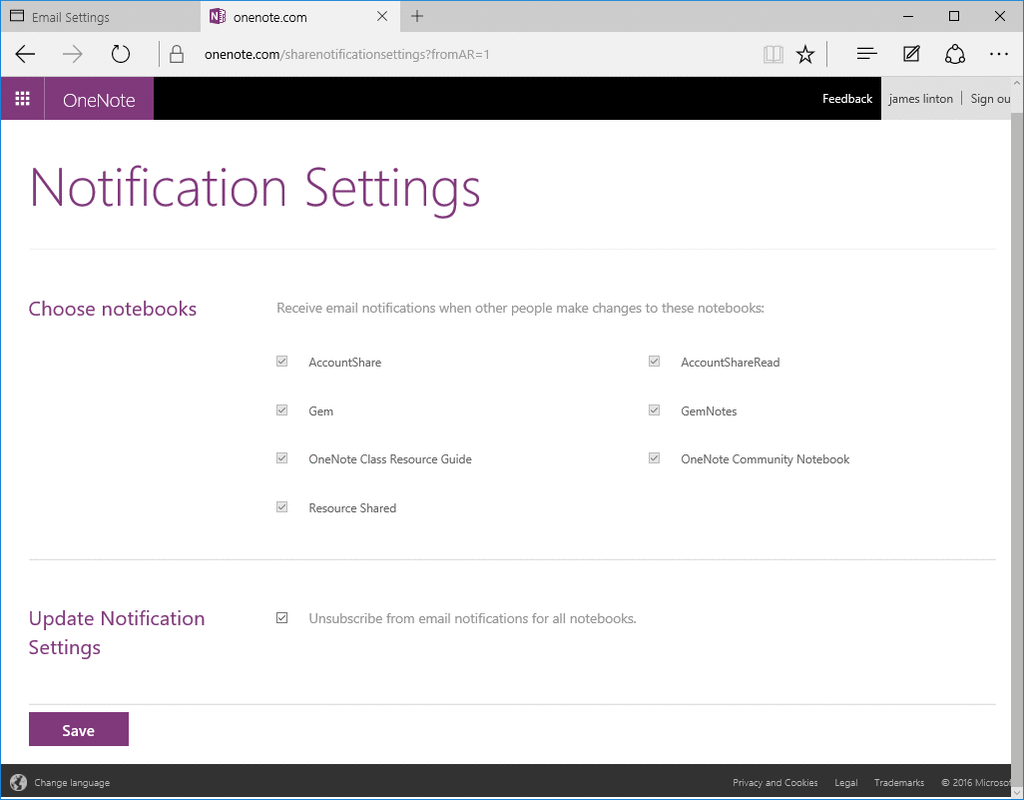
我們可以直接到網頁 https://www.onenote.com/sharenotificationsettings 去設置哪些筆記本在被其他同事修改後,進行郵件通知。
當然,假若妳安裝有 "Gem for OneNote" 插件,則妳可以輕便的從桌面版 OneNote 快速打開這個頁面。
打開訂閱 OneNote 郵件通知設置網頁
在 "Gem for OneNote" 中,點擊“協作”選項卡 -> “共享”組 -> "One Drive" 菜單 -> “共享筆記本通知設置”菜單項。
當然,假若妳安裝有 "Gem for OneNote" 插件,則妳可以輕便的從桌面版 OneNote 快速打開這個頁面。
打開訂閱 OneNote 郵件通知設置網頁
在 "Gem for OneNote" 中,點擊“協作”選項卡 -> “共享”組 -> "One Drive" 菜單 -> “共享筆記本通知設置”菜單項。
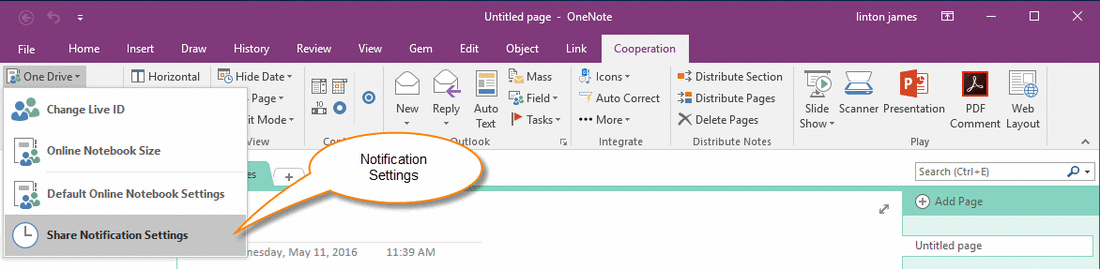
筆記本通知設置
Gem 會打開網頁 https://www.onenote.com/sharenotificationsettings.
妳只需要登錄進入網頁,就可以選擇哪些筆記本壹旦發送變化,就通過郵件通知妳。
Gem 會打開網頁 https://www.onenote.com/sharenotificationsettings.
妳只需要登錄進入網頁,就可以選擇哪些筆記本壹旦發送變化,就通過郵件通知妳。