Office OneNote 更新到 v2407 後,在打字或者進行拼寫檢查時會崩潰
2024-08-17
數字筆記珍寶
微軟官方 2024年8月15日 的更新支持文檔中,承認包括 Outlook、Word、OneNote 在內的 Office 應用存在 BUG,用戶在輸入、檢查拼寫或者或執行其他編寫任務和操作時可能會遇到崩潰情況。
微軟表示 2024年8月1日 發布的 Office Version 2407,Build 17830.20138 以及後續版本均存在上述問題,在事件日誌查看器中會記錄為 Event 1000 或者 Event 1001。
支持文檔中,微軟表示之所以出現上述問題,其根源可能在於語言包過時:
如果語言包版本沒有更新到當前版本,可能會出現這個問題。
用戶可以檢查 C:\Program Files\Microsoft Officeoot\Office16\mscss7xx.dll 的版本,理論上版本號應該是與 Office 版本密切匹配,但可能出現不完全匹配的情況。
Excel for Microsoft 365 Word for Microsoft 365 Outlook for Microsoft 365 PowerPoint for Microsoft 365 OneNote for Microsoft 365
Last Updated: September 9, 2024
After updating to Version 2407 Build 17830.20138 or higher you find that Outlook, Word, or OneNote may unexpectedly close when typing or doing other authoring tasks such as spell check.
You can confirm if this is the issue by looking at the Windows Event Viewer Application Log for Event 1000 or Event 1001, and the following event details:
Faulting application name: OUTLOOK.EXE, version: 16.0.17830.20138, time stamp: 0x66aaad8c
Faulting module name: mscss7it.dll, version: 16.0.12527.20122, time stamp: 0x5e439ea1 Exception code: 0xc0000005
Fault offset: 0x000000000003e518
Faulting process id: 0x0x51B0
Faulting application start time: 0x0x1DAE97DD89190C3
Faulting application name: OUTLOOK.EXE, version: 16.0.17830.20166, time stamp: 0x66b7aa44
Faulting module name: mscss7ge.dll, version: 16.0.4288.1000, time stamp: 0x55f830b9
Exception code: 0xc0000005
Fault offset: 0x0000000000031991
Faulting process id: 0x0x506C
Faulting application start time: 0x0x1DAEE7B92076D82
The faulting module name will vary depending on what language packs you have installed. For example, mscss7it.dll for Italian, or mscss7ge.dll, for German, and others could include: EN, ES, FR, GE, IT, NP, PB.
This issue may occur if the language pack version is not updated to the current version. If you check the version of the C:\Program Files\Microsoft Office\root\Office16\ mscss7xx.dll it should be a build closely matching the Office version but might not match exactly.
To work around the issue, do the following:
https://support.microsoft.com/en-us/office/outlook-word-or-onenote-unexpectedly-close-when-typing-6488214d-f08f-4d0f-b45a-c8180ee98bda
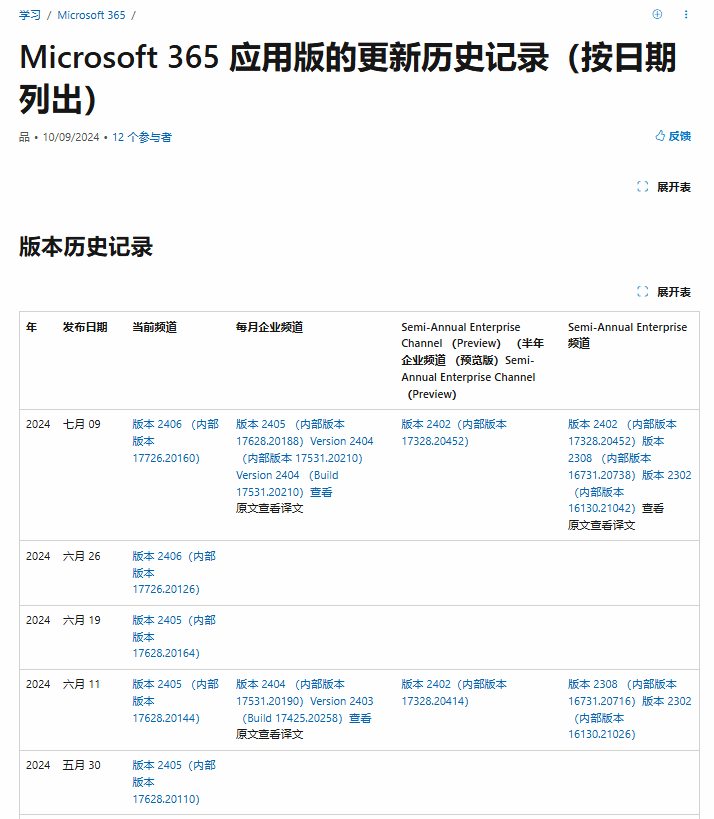
微軟表示 2024年8月1日 發布的 Office Version 2407,Build 17830.20138 以及後續版本均存在上述問題,在事件日誌查看器中會記錄為 Event 1000 或者 Event 1001。
支持文檔中,微軟表示之所以出現上述問題,其根源可能在於語言包過時:
如果語言包版本沒有更新到當前版本,可能會出現這個問題。
用戶可以檢查 C:\Program Files\Microsoft Officeoot\Office16\mscss7xx.dll 的版本,理論上版本號應該是與 Office 版本密切匹配,但可能出現不完全匹配的情況。
原因
崩潰問題是由於 Office 2016 校對工具與 Office 語言包(M365 企業應用程序)共存之間的版本不匹配引起的。這些校對工具可能是以前安裝的舊痕跡或 Office 套件遷移的壹部分。
由於同壹版本的安裝技術不同,因此不支持 Office 2016 與 M365 應用程序共存。安裝了即點即用安裝的 Office,就不支持在同壹臺計算機上安裝 Windows Installer 的 Office。
修復
2024.9.9 修復。歷時 40 天。
期間曾經發布 2 個版本:
期間曾經發布 2 個版本:
- 2024.8.01 版本 2407 (內部版本 17830.20138)
- ...
- 2024.8.13 版本 2407 (內部版本 17830.20166)
- 2024.8.26 版本 2408 (內部版本 17928.20114)
- ...
- 2024.9.09 版本 2409 (內部版本 18025.20000)
已經在以下版本進行修復:
- Beta 頻道: 版本 2409 (內部版本 18021.15000)
- 當前預覽頻道: 版本 2409 (內部版本 18025.20000)
- 當前頻道: 版本 2409 (內部版本 18025.20000) ETA 9/24/24
Outlook, Word, or OneNote unexpectedly close when typing
Excel for Microsoft 365 Word for Microsoft 365 Outlook for Microsoft 365 PowerPoint for Microsoft 365 OneNote for Microsoft 365
Last Updated: September 9, 2024
ISSUE
After updating to Version 2407 Build 17830.20138 or higher you find that Outlook, Word, or OneNote may unexpectedly close when typing or doing other authoring tasks such as spell check.
You can confirm if this is the issue by looking at the Windows Event Viewer Application Log for Event 1000 or Event 1001, and the following event details:
Faulting application name: OUTLOOK.EXE, version: 16.0.17830.20138, time stamp: 0x66aaad8c
Faulting module name: mscss7it.dll, version: 16.0.12527.20122, time stamp: 0x5e439ea1 Exception code: 0xc0000005
Fault offset: 0x000000000003e518
Faulting process id: 0x0x51B0
Faulting application start time: 0x0x1DAE97DD89190C3
Faulting application name: OUTLOOK.EXE, version: 16.0.17830.20166, time stamp: 0x66b7aa44
Faulting module name: mscss7ge.dll, version: 16.0.4288.1000, time stamp: 0x55f830b9
Exception code: 0xc0000005
Fault offset: 0x0000000000031991
Faulting process id: 0x0x506C
Faulting application start time: 0x0x1DAEE7B92076D82
The faulting module name will vary depending on what language packs you have installed. For example, mscss7it.dll for Italian, or mscss7ge.dll, for German, and others could include: EN, ES, FR, GE, IT, NP, PB.
This issue may occur if the language pack version is not updated to the current version. If you check the version of the C:\Program Files\Microsoft Office\root\Office16\ mscss7xx.dll it should be a build closely matching the Office version but might not match exactly.
CAUSE
The crash issue is caused due to version mismatch between Office 2016 proofing tools in coexistence with Office language packs (M365 apps for Enterprise). These proofing tools are probably old traces from previous installs or part of Office suite migration.
Coexistence of Office 2016 side by side with M365 apps is not supported due to different installation technologies of same version. For more information, go to Office installed with Click-to-Run and Windows Installer on same computer isn't supported.
STATUS: WORKAROUND
This issue is fixed in the following builds:
Beta Channel: Version 2409 (Build 18021.15000)
Current Channel Preview: Version 2409 (Build 18025.20000)
Current Channel: Version 2409 (Build 18025.20000) ETA 9/24/24
This fix addresses two problems:
- Older versions of proofing tools installed with M365 Office.
Office 2016 proofing tools are offered for download via standalone per-language installers. Even if they may appear to function correctly, however, using these Office 2016 proofing tools together with later versions of Office is not supported.
This fix prevents a crash in Word, Outlook, OneNote and PowerPoint caused by this unsupported installation scenario. Users are strongly recommended to uninstall the Office 2016 proofing tools if they are using a later version of Office and to install the appropriate Office language packs instead. Office language packs update automatically along with the version of Office they are paired with.
- Current versions of M365 Office where the language pack version is different from the main installer.
This fix also addresses problems when M365 Click to Run language pack version is different from the main installer. The fix will prevent future occurrences of the issue. If you still see the issue after the fixed build you will need to repair Office per the workaround guidance below.
To work around the issue, do the following:
- Do an online repair of the Office application, Repair an Office application.
- If the event log event shows the faulting module with a version such as 16.0.4288.1000 then this means you have an older MSI version of the language installed. Go to Windows Settings > Apps > Installed Apps and look for the old Office language installation and uninstall it.
- Uninstall and reinstall the language pack, see “Step 2: Configure Microsoft 365 language”, Language Accessory Pack for Microsoft 365.
https://support.microsoft.com/en-us/office/outlook-word-or-onenote-unexpectedly-close-when-typing-6488214d-f08f-4d0f-b45a-c8180ee98bda
OneNoteGem
| EXE 插件 | 雲版插件 | MAC 插件 |

