站內搜索
數字筆記珍寶插件 OneNoteGem
  • 首頁
  • 插件
    • Windows Office 插件 >
      • 數字筆記珍寶 Gem for OneNote 79.0.0.365
      • 批量處理器 OneNote Batch 40.3.0.223
      • 數字筆記思維導圖插件 Mind Map for OneNote 12.6.0.79
      • 數字筆記珍寶之至愛 OneNote Gem - Favorites 36.2.0.146
      • 腦橋 Pons for MindManager and OneNote 20.2.25.78
      • 自動工具 Auto OneNote 3.9.0.36
      • 搜索工具欄 OneNote Search Bar 7.3.0.36
      • 筆記錨 Anchor to OneNote 17.0.0.98
      • 筆記 PDF 錨 Anchor to OneNote for PDF 7.0.0.26
      • 表格行筆記 Row to OneNote 15.0.0.51
      • 添加到數字筆記 Bring to OneNote 18.1.0.111
      • 收藏到數字筆記 Favorite to OneNote 17.0.0.67
      • 腦橋 Pons for Visio and OneNote 10.3.0.31
      • 彩虹橋 Bridge for EndNote and OneNote 7.3.0.31
      • 珍寶表格 Gem Table for OneNote 6.0.0.18
    • Windows Web 雲端插件 >
      • 精摘板 CiteBoard for OneNote 3.0.0.5
      • 視窗版思維壹圖 OneMind 雲版
      • OneNote 共享頁面閱讀器 OneReader 1.0.0.0
      • OneNote Reminder 提醒工具(雲版)
      • 雲版批量處理器 OneNote Batch Cloud 8.0.0.19
    • Mac 插件 >
      • 蘋果版珍寶菜單 Gem Menu for Mac OneNote 20.5.2.184
      • 精摘板 CiteBoard for OneNote 3.0.0.5
      • 蘋果版思維壹圖 OneMind for Mac OneNote
      • 蘋果版批量處理器 OneNote Batch for Mac 10.2.0.70
      • 蘋果版 Fix One for Mac 修復 Mac OneNote 登錄、同步工具 2.0
      • 蘋果版提醒工具 OneNote Reminder for Mac
    • 安卓插件 >
      • 精摘板 CiteBoard for OneNote 3.0.0.5
      • 安卓版 Fix One for Android 修復 OneNote 登錄、同步工具 1.0
    • 跨平臺插件 >
      • 思維壹圖 OneMind for OneNote 2.10.0.26
      • 提醒工具 OneNote Reminder 16.0.0.81
      • 精摘板 CiteBoard for OneNote 3.0.0.5
      • Fix One 修復 OneNote 網絡登錄同步工具
    • Markdown 插件 >
      • 數字筆記珍寶 Gem for OneNote 79.0.0.365
      • 珍寶壹脈 One Markdown 4.1.0.15
    • 思維導圖插件 >
      • 數字筆記思維導圖插件 Mind Map for OneNote 12.6.0.79
      • 數字筆記珍寶之至愛 OneNote Gem - Favorites 36.2.0.146
      • 思維壹圖 OneMind for OneNote 2.10.0.26
      • 腦橋 Pons for MindManager and OneNote 20.2.25.78
      • 腦橋 Pons for Visio and OneNote 10.3.0.31
    • 其他插件 >
      • UWP 版珍寶菜單 Gem Menu for OneNote UWP 25.1.0.54
      • 珍寶壹脈 One Markdown 4.1.0.15
      • 剪輯到數字筆記 Clip to OneNote
      • 珍寶文檔筆記 Gem WordNote 9.3.0.23
      • OneNote 單頁面共享 OneShare
      • Fix One for Windows 修復 OneNote 登錄同步工具 14.1
      • OneNote for Windows 10 起死回生版 UWP Reviver 1.1
  • 購買
  • 模板
  • 文檔教程
  • 疑難問題
  • 支持
  • 珍寶文檔筆記
思維導圖
 
AD
 
使用 OneNote 原生元素來創建思維導圖。時間軸。

事件:OneNote 2010 突然筆記本所有分區消失,只顯示“此筆記本或分區組中沒有打開的分區”

2019-11-13
 
數字筆記珍寶
問題:

從 2017.5.24 開始,在 OneNote 2010 裏出現所有共享筆記本(保存在 OneDrive 上的筆記本)的所有分區消失不見了,然後,過段時間,所有分區重新同步了下來。在第二天,或者是關閉 OneNote 2010 後,再打開 OneNote 2010,又重復出現這種情況。所有分區不停的消失,又重新同步下來。不知是何原因?
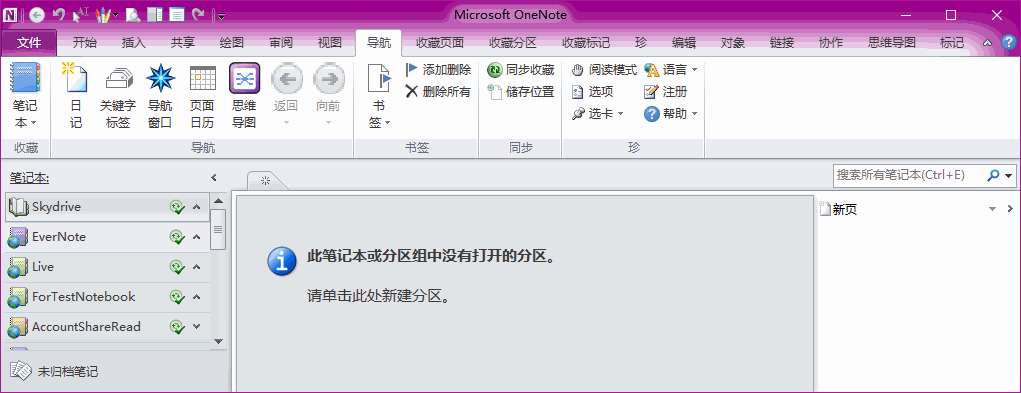
此筆記本或分區組中沒有打開的分區。請單擊此處創建新分區。

 
現象:
現在已經基本確認為 OneDrive 服務器端出現問題。
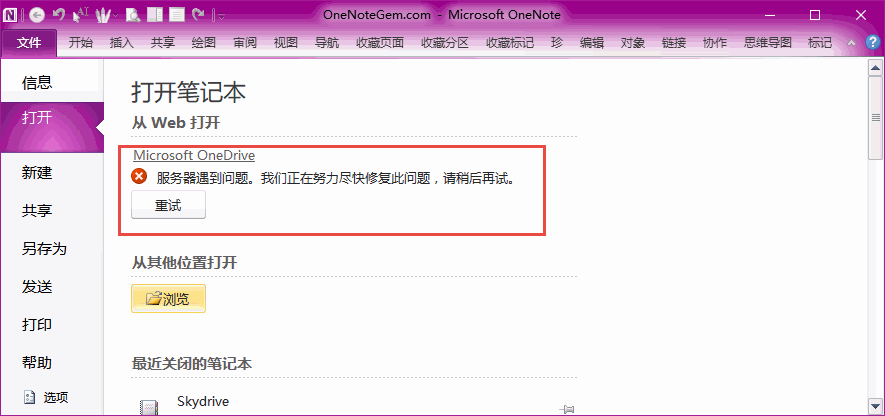
有時候,會從服務端返回以下錯誤信息:
Microsoft OneDrive
服務器遇到問題。我們正在努力盡快修復此問題,請稍後再試。
 
原因:
Update 6/19 1PM PDT: as far as I can tell this has been fixed. Please post here if it recurrs.

Update 6/15 11AM PDT: doesn't look like they were right about the cause. OneDrive still investigating.

Update 6/13 10:30AM PDT: While the previous error is fixed, error code 0x800701F4 is happening intermittently for many users. The OneDrive team claims this is a "caching error stemming from their previous fix" and should resolve "today" with the deployments. If it doesn't I'll continue to bug them and update here.

The message I see is The Web server is reporting an internal error. If this error persists, contact the server administrator. (Error code: 0x800701F4).


Update 6/9 6PM PDT: According to the OneDrive team they've fixed this issue. Please let me know if it recurs.

OneNote Engineer here: We're aware of this problem and working to get it resolved ASAP. Thanks for letting us know!

6/9: We've narrowed it down to a problem with receiving an updated authentication token from OneDrive. This results in OneNote believing you don't have permission to the sections and removing them from display.

Update 6/8: As mentioned above, if you open the notebook in Edge and restart all processes, OneNote 2010 appears to properly get the auth token and sync properly.
解決辦法:

方法 1:
有時候使用“Fix One”工具修復網絡問題會有效果 (可能需要重啟電腦)。可以試試。

方法 2:
采用脫機方式使用。在共享筆記本同步窗口裏,把“只要發生更改就自動同步”改為“脫機工作 - 僅在單擊”全部同步”時才進行同步。

方法 3:
也可以升級到 OneNote 2016 或者是 2013,這些版本沒有出現這種情況。

相關問題:

  • 2016年8月18日,突然 OneNote 筆記本被清空

OneNoteGem
 
EXE 插件 雲版插件 MAC 插件

相關文章

  • 如何回滾 OneNote 筆記本來恢復由於移動分區導致的分區丟失問題?
  • 從Windows的 OneDrive 文件夾刪除 OneNote 筆記本時彈出錯誤:無法刪除 OneNote 快捷方式
  • OneNote 裏突然出現很多名字重復的筆記本,如何清除?
  • OneNote 筆記本太大,同步出現錯誤:0xE0000025
  • 如何把別人共享給我的 OneNote 筆記本從“與我共享”列表中刪除?
​​OneNote 標簽
OneNote 表格公式​

​思維導圖插件比較​
​查找搜索功能比較​
​One Markdown 語法
插件修復
​珍寶菜單模板
子插件
OneNote 下載
OneNote 書籍下載
OneDrive 下載
OneNote 入門基礎
手機版網站
版權所有 © 2011-2026 數字珍寶軟件 OneNoteGem.com.
英文官網 中文官網