發送至 ( Send to ) OneNote 修復工具
2019-11-12
數字筆記珍寶
當我們升級 IE 版本時,會導致 IE 中的“發送至 OneNote”( Send to OneNote ) 消失不見。
其中最主要的是,IE 中右鍵彈出菜單中的“發送至 OneNote”菜單項的消失。
( 註意 :這裏所說 Send to OneNote 的並不是打印功能中的 Send to OneNote)
當出現這種情況時,可以使用 Bring to OneNote 的修復工具來修復 Send to OneNote.
步驟:
這樣,該工具就會修復“發送至 OneNote”右鍵菜單了。
另:妳也可以使用 Bring to OneNote for IE 來替換 Send to OneNote 功能,Bring to OneNote 在發送到 OneNote 前可以新建分區組和分區。
Bring to OneNote 修復工具包含在 Bring to OneNote 安裝包中。
下載 Bring to OneNote.
其中最主要的是,IE 中右鍵彈出菜單中的“發送至 OneNote”菜單項的消失。
( 註意 :這裏所說 Send to OneNote 的並不是打印功能中的 Send to OneNote)
當出現這種情況時,可以使用 Bring to OneNote 的修復工具來修復 Send to OneNote.
步驟:
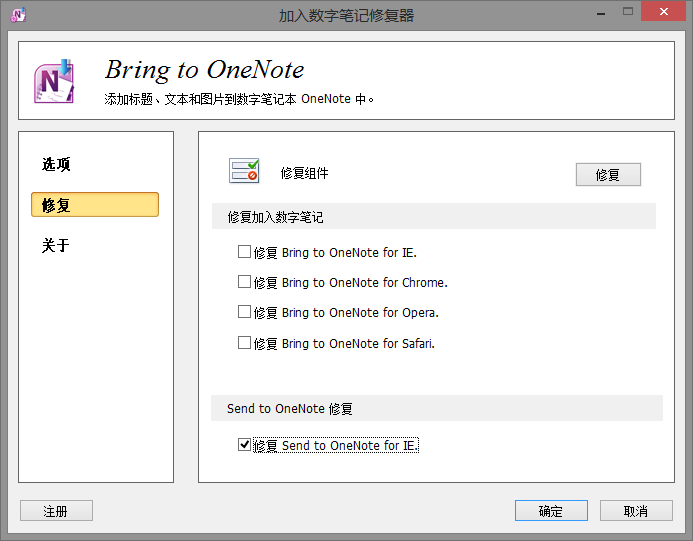
- 打開 Bring to OneNote 修復工具 ( Bring to OneNote Fix Tool ).
- 點擊“修復”選項卡。
- 在“修復 Send to OneNote for IE”打上鉤。
- 點擊“修復”按鈕。
這樣,該工具就會修復“發送至 OneNote”右鍵菜單了。
另:妳也可以使用 Bring to OneNote for IE 來替換 Send to OneNote 功能,Bring to OneNote 在發送到 OneNote 前可以新建分區組和分區。
Bring to OneNote 修復工具包含在 Bring to OneNote 安裝包中。
下載 Bring to OneNote.
OneNoteGem

